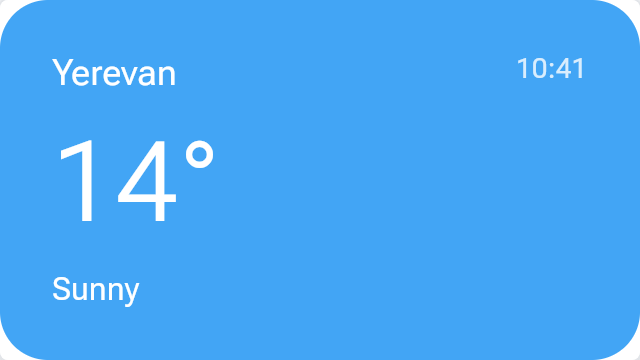
Weather widget
Change Viewport to Widget 320×180 or Small 240×240 to see the layout switch; change temperature in the Host values tab to see live data arrive without a new document.
Open the live, interactive demo →
Change its controls, read the remote document it produces and the diff after every change.
What it is
A widget that rearranges itself for its size and shows live data the app supplies.
Good for
- Home-screen and glanceable widgets
- Live scores, prices, delivery status
Code
The story's source with androidx.compose.remote imports. CI compiles every snippet on this site against AndroidX.
import androidx.compose.remote.creation.compose.layout.RemoteAlignment
import androidx.compose.remote.creation.compose.layout.RemoteArrangement
import androidx.compose.remote.creation.compose.layout.RemoteBox
import androidx.compose.remote.creation.compose.layout.RemoteColumn
import androidx.compose.remote.creation.compose.layout.RemoteComposable
import androidx.compose.remote.creation.compose.layout.RemoteFitBox
import androidx.compose.remote.creation.compose.layout.RemoteRow
import androidx.compose.remote.creation.compose.layout.RemoteText
import androidx.compose.remote.creation.compose.modifier.RemoteModifier
import androidx.compose.remote.creation.compose.modifier.background
import androidx.compose.remote.creation.compose.modifier.clip
import androidx.compose.remote.creation.compose.modifier.fillMaxSize
import androidx.compose.remote.creation.compose.modifier.fillMaxWidth
import androidx.compose.remote.creation.compose.modifier.padding
import androidx.compose.remote.creation.compose.modifier.size
import androidx.compose.remote.creation.compose.shapes.RemoteRoundedCornerShape
import androidx.compose.remote.creation.compose.state.RemoteInt
import androidx.compose.remote.creation.compose.state.RemoteString
import androidx.compose.remote.creation.compose.state.RemoteTimeVariables
import androidx.compose.remote.creation.compose.state.rc
import androidx.compose.remote.creation.compose.state.rdp
import androidx.compose.remote.creation.compose.state.rememberNamedRemoteInt
import androidx.compose.remote.creation.compose.state.rememberNamedRemoteString
import androidx.compose.remote.creation.compose.state.ri
import androidx.compose.remote.creation.compose.state.rs
import androidx.compose.remote.creation.compose.state.rsp
import androidx.compose.remote.creation.compose.text.RemoteFontWeight
import androidx.compose.runtime.Composable
import androidx.compose.ui.graphics.Color

/** An integer as two digits ("07"): a remote select, evaluated by the player. */
fun twoDigits(value: RemoteInt): RemoteString =
    value.isLessThan(10.ri).select("0".rs + value.toRemoteString(), value.toRemoteString())

/**
 * A weather widget at three sizes. The temperature and the condition are named values the app
 * refreshes (try the Host values tab); the clock is the player's own.
 */
@Composable
@RemoteComposable
fun WeatherWidget(city: String, temperature: Int, condition: String) {
    val temp = rememberNamedRemoteInt("temperature", temperature)
    val sky = rememberNamedRemoteString("condition", condition)
    val time = RemoteTimeVariables
    val clock = twoDigits(time.hourOfDay) + ":".rs + twoDigits(time.minuteOfDay % 60.ri)
    val gradientTop = Color(0xFF42A5F5).rc
    RemoteBox(
        RemoteModifier.fillMaxSize().clip(RemoteRoundedCornerShape(24.rdp)).background(gradientTop),
        contentAlignment = RemoteAlignment.Center,
    ) {
        // The player picks the largest layout that fits the widget's size.
        RemoteFitBox(
            RemoteModifier.fillMaxSize(),
            horizontalAlignment = RemoteAlignment.CenterHorizontally,
            verticalArrangement = RemoteArrangement.Center,
        ) {
            RemoteColumn(
                RemoteModifier.size(300.rdp, 160.rdp).padding(16.rdp),
                verticalArrangement = RemoteArrangement.SpaceBetween,
            ) {
                RemoteRow(
                    RemoteModifier.fillMaxWidth(),
                    horizontalArrangement = RemoteArrangement.SpaceBetween,
                ) {
                    RemoteText(city.rs, color = Color.White.rc, fontSize = 18.rsp)
                    RemoteText(clock, color = Color(0xCCFFFFFF).rc, fontSize = 14.rsp)
                }
                RemoteText(
                    temp.toRemoteString() + "°".rs,
                    color = Color.White.rc,
                    fontSize = 56.rsp,
                    fontWeight = RemoteFontWeight.Light,
                )
                RemoteText(sky, color = Color.White.rc, fontSize = 16.rsp)
            }
            RemoteColumn(
                RemoteModifier.size(150.rdp, 150.rdp).padding(12.rdp),
                horizontalAlignment = RemoteAlignment.CenterHorizontally,
                verticalArrangement = RemoteArrangement.Center,
            ) {
                RemoteText(city.rs, color = Color.White.rc, fontSize = 14.rsp, maxLines = 1)
                RemoteText(
                    temp.toRemoteString() + "°".rs,
                    color = Color.White.rc,
                    fontSize = 44.rsp,
                )
                RemoteText(sky, color = Color.White.rc, fontSize = 12.rsp, maxLines = 1)
            }
            RemoteBox(RemoteModifier.size(72.rdp), contentAlignment = RemoteAlignment.Center) {
                RemoteText(
                    temp.toRemoteString() + "°".rs,
                    color = Color.White.rc,
                    fontSize = 28.rsp,
                )
            }
        }
    }
}
API
creation.compose.layout.RemoteFitBox
void RemoteFitBox(optional RemoteModifier modifier, optional RemoteAlignment.Horizontal horizontalAlignment, optional RemoteArrangement.Vertical verticalArrangement, optional () -> Unit content)creation.compose.state.rememberNamedRemoteInt
RemoteInt rememberNamedRemoteInt(String name, int defaultValue, optional RemoteState.Domain domain)creation.compose.state.RemoteTimeVariables
class RemoteTimeVariables
  RemoteFloat animationDeltaTime
  RemoteFloat animationTime
  RemoteFloat continuousSeconds
  RemoteInt dayOfMonth
  RemoteInt dayOfWeek
  RemoteInt dayOfYear
  RemoteInt epochSecond
  RemoteInt hourOfDay
  RemoteInt minuteOfDay
  RemoteInt month
  RemoteInt secondOfHour
  RemoteInt utcOffsetSeconds
  RemoteInt year
  RemoteTimeVariables INSTANCE